Sad Bhojpuri Capcut template – Friends, there’s a trend going on on social media these days in which everyone is editing and sharing their videos. You won’t find a reel without editing these days, and the more well-edited videos are going viral. Whether it’s an attitude reel, a sad song, or any other, video editing in all genres is going viral. Similarly, a video edit of a Bhojpuri song is going viral, featuring a sad video. Friends, this viral Bhojpuri sad video is in high demand. You must have seen how I demonstrated its editing on Instagram. In this article, I’m going to show you how to edit this viral Bhojpuri sad song. I’ll teach you the process, along with the editing process. If you’d like to edit a video featuring a sad song, follow this article. You’ll find complete information.
Details Of Sad Bhojpuri Capcut template
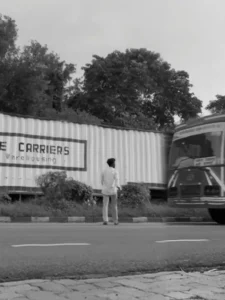
We’re going to use a template for this video editing, so let me explain it first. We’re going to use this template in Capcut, which has all the video editing features pre-installed, which will automatically edit our clips. The editing is such that it incorporates emotional video editing with slow motion. You’ll see in the preview that the video starts with a man running slowly down the road. As he reaches the middle of the road, a large truck approaches him. The editing begins precisely on this very scene. The video freezes as the truck approaches, and a black and white filter is used. A vibration effect is also used in the video, including filter effects like flash vibration and golden glow. Using this template, you’ll be able to edit your video in the same style. You can see the full editing of the template in the application.
How To Prepare Clip For Video Edit?
Friends, for this type of video editing, you can use your own sad video clips, in which you appear in a sad mood. If you don’t have such clips, you can record them first. For example, record a video clip of yourself walking in a sad mood. Or, as is trending, record a sad video of yourself walking on an empty road. Then, record another clip in which a vehicle is seen passing on that road. Once you’ve recorded these two clips, you can easily edit them using them as a template. The link to the template has been shared under the “Check Template” button below the image. You can check the template by clicking on it.
How To Use Sad Bhojpuri Capcut Template
Friends, if you want to edit your video using a Capcut template, then using a Capcut template is quite easy. First, install the Capcut application on your phone. Open it and go to the “Discover” option. Here, you’ll find numerous templates that you can use for free. Click on the “Search” option and search for the template you want by typing its name. You’ll find that template. You can use it. If you can’t find it, I have another way.
- Click on the “Check Template” button on our website.
- The application will open, and you’ll see a preview of the template.
- You’ll see a “Use” button. Click on it, and then add your clip to it.
- You’ll need to provide as many clips as you need.
- Then click “Next.” Your video will be created and ready in a few moments.
- This way, you can automatically edit your video.
Conclusion
Final Words And friends, let me tell you that if you have done this then you must have got to know all the details and with all the details you will be able to do it very easily and it will not take you much time here. It will not take much time. Just do it using this method. You will be able to prepare your video and without much effort your video will go viral and will be created. If you have any doubt then you can ask us by commenting, otherwise we always keep giving new trending content here. Whose mother, whose you do it, you can make your video viral very scientifically.