Koi Aaye Na Rabba Capcut Template – Friends, a particular style of cinematic video editing is currently going viral—one featuring a melancholic, cinematic aesthetic and formatted in landscape orientation. In this article, I am going to teach you how to create that very same video edit. You have likely already come across this editing style on Instagram Reels, and I have previously shared tutorials on how to achieve it. So, friends, if you have watched my editing tutorials before, you already know that we will be editing this viral video using a template. The exact same effects and edits applied in the original viral video will be automatically applied to your own clips, as using a template eliminates the need for manual editing. If you would like to learn how to do this, simply follow the steps outlined below to create your own edit.
Details Of Koi Aaye Na Rabba Capcut Template
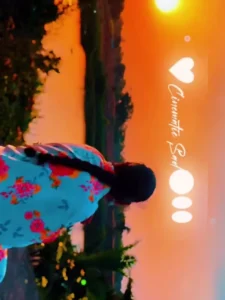
As you can see, the editing applied to this template gives the video a somewhat melancholic aesthetic. In the preview, you will observe that the video begins with a cinematic sequence—presented in landscape orientation—where a subtle blur effect is utilized for just a brief moment. Subsequently, a poignant text overlay appears on the screen, and a slow-motion effect is applied to the video footage. The video clip then transitions to the next segment using a transition effect, which also features a mild slow-motion application. This pattern continues, with the clip changing two more times using the same effects. The template incorporates a cinematic filter and a “sunset” visual style. Furthermore, the video has been edited to accompany a melancholic song; you can customize this template by inserting your own clips that align with this same melancholic theme.
How To Record Video Clip For This Editing?
Look, friends: if you want to achieve perfect editing results using this template, you should first record the necessary video clips specifically for it. Make sure to record your video in landscape mode. Ideally, you should film in the evening—specifically in an area with a “sunset look,” where the soft glow of the setting sun is present—while walking naturally with a melancholic demeanor. Record these clips from various camera angles and in different styles to add variety. It is crucial to record the clips while embodying a “sad” vibe to ensure you get the best possible outcome after editing. Once recorded, you can then apply the template to edit your video. Below, I have provided the button for the template, accompanied by a preview image. However, before clicking on it, please take a moment to learn how to use the template—step-by-step—in the next paragraph.
How To Use Koi Aaye Na Rabba Capcut Template
So friends, I have now shared with you all the important information regarding this template. Now, let me explain how you can use it to edit your own photos. To use any CapCut template, you simply need to open the CapCut application and click on the “Templates” option you see there; you will find an unlimited selection of templates available. You can search for the specific name of this template within the app to locate it and start using it. However, sometimes the exact template we are looking for does not appear, even after searching. In such cases, there is an alternative method, which I will guide you through step-by-step.
- First, click on the “Check Template” button provided within this article.
- This will open the template directly within the CapCut application.
- Next, click on the “Use” option and add the required video clips from your device.
- Then, click “Next” and wait for a few moments while the template automatically edits your video.
- After a short while, your edited video will be ready; you can then save it using the “Export” option.
- In this way, the system will automatically edit and finalize your video.
Conclusion
In this way, you can easily edit this viral, cinematic-style video using a template. Templates have now effectively solved your video editing challenges. If you are looking for more unique and trending templates like this, you can explore the many options available on CapCut, or you can visit our website to check them out. Please note that this is not the official CapCut website; it is our own independent site, where we provide tutorials on various techniques for both video and photo editing.