Viral Ai Video Editing – Friends, currently, various types of AI videos are going viral across social media platforms. Creating these kinds of AI videos is remarkably easy—so much so that people are generating and sharing them with the help of AI tools. In this article, I am going to teach you how to create one such viral AI video. If you follow the steps outlined in this article, you will learn the entire process and be able to create your own viral video featuring your own face. So, if you are interested in learning how to do this, I will walk you through the complete process in this article; please read it carefully.
Details Of Viral Ai Video Editing
First, let me explain the details of this viral AI video edit. This edit features a motorcycle; if you want a similar video featuring your own bike, you can create this AI video yourself. In the video, you see a bike key falling onto the road from above, followed by the front wheel rolling in, then the rear wheel, and then the fuel tank; the bike’s parts assemble one by one until the motorcycle is fully formed. It looks like a robotic bike assembling itself. This video is created using AI, and you can make one using a photo of your own bike to achieve a realistic look. I will explain the process in the following paragraph.
Process Of This Ai Video Editing?
The process of creating this video is quite simple; reading this paragraph will give you all the details. To make this video, you will need two photos and a prompt. The first photo should be of your bike key, so go ahead and snap a picture of it. The second photo should be of your bike—specifically, an image of your favorite bike. As for the third element—the prompt—I am providing it right here in this article; this is the prompt you will use to generate the video. You can find the video prompt in the paragraph below, positioned right under the image. I explain the video generation process in the next paragraph, where you can follow the step-by-step instructions to create your video.
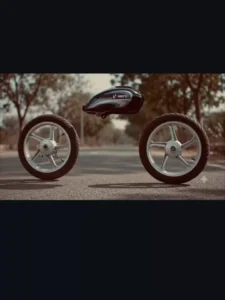
Video Prompt –
The key falls in smooth slow motion and transforms into a rotating motorcycle front tyre as it touches the ground, with soft dust flowing outward. Motorcycle parts enter from outside the frame in a strict step-by-step order: first the fuel tank, then the rear tyre, followed by all remaining components-frame, suspension, engine, exhaust, handlebars, seat, panels, cables, bolts, and body elements-each rotating, aligning, and attaching one by one with precise
mechanical motion. The assembly is fast but sequential, with only one major part attaching at a time, enhanced by motion blur, air movement, and ground dust. The motorcycle completes seamlessly into the second image, fully assembled and realistic as dust
Settles
How To Generate Ai Video?
Friends, to generate an AI video, simply copy the video prompt provided in this article and open the Google Flow website. You can also access this website by clicking the “Generate Video” button included in the article. Next, log in to the site, click on “New Project,” select “Start Frame” to upload your image, paste the prompt, and click the “Send” button. In just a short while, your AI video will be ready. You can then save it. Friends, this entire process is available to you completely free of charge.
Conclusion
I hope you have understood the process behind this viral AI video editing and that you will be able to easily perform this editing yourself. Friends, I have taught you how to edit in a very simple manner; please do let me know in the comments how you found it. And to learn more AI video editing techniques like this, keep visiting this website.