Trending Car AI Video Editing – Hello friends, welcome to our website! In today’s article, I’m going to show you how to create a very unique and creative AI video that is currently trending on social media. If you are active on Instagram, you may have already seen this type of car AI video where a simple photo is transformed into a cinematic video. The interesting part is that the entire video can be created with the help of AI using just one photo. When I came across this trending car video and saw how much engagement it was getting, I thought we should also try this type of AI video editing. If you also want to create a similar video using your own photo, then stay with this article. I’ll explain the complete process step by step so that you can easily create your own Trending Car AI Video.
About Trending Car AI Video Editing
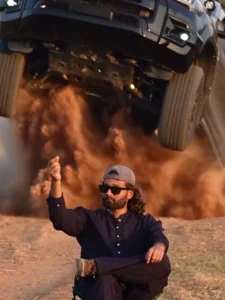
Friends, let’s first understand what this trending AI video looks like. In the video, a person can be seen sitting casually on a chair while the scene remains completely normal. After a moment, the person snaps their fingers, and suddenly a black SUV appears from behind them, passes through the scene, and drives away. The most interesting part of the video is the car entry. The movement of the car, the person’s position, and the overall environment look so natural that the video feels like a scene from a movie. This creative car-entry concept is what makes the video so attractive to viewers. We are going to create a similar video with the help of AI. For this, we will use Google Flow AI, where we can turn our image into a realistic video by using an appropriate prompt. You simply need a suitable photo and then follow the process given below.
Why Is This Car AI Video Trending?
Friends, the main reason behind the popularity of this type of video is its unique concept. Instead of using a normal video-editing effect, the entire scene is created with the help of AI. A simple photo is transformed into a cinematic video, which makes the final result look completely different from an ordinary reel. The car entering the scene is the main highlight of the video. Its movement and timing make the video look like a professionally shot cinematic scene. The person sitting on the chair also remains naturally positioned while the car moves through the background, which makes the complete scene more interesting. Because of this creative idea, people are watching, sharing, and recreating similar AI videos on social media. If you also want to experiment with this viral car AI video editing style, you can create your own version using your photo and an AI video generator.
Video Prompt –
Use the uploaded character photo as the exact identity reference for the main character.

Create a cinematic video using the reference video as the primary motion and performance guide. Preserve the character's facial identity, facial proportions, hairstyle, skin tone, body proportions, and overall appearance consistently throughout the entire video.

The character should perform the same actions, body movements, gestures, timing, posture changes, walking style, and expressions as the person in the reference video. Match the reference video's camera movement, framing, shot composition, perspective, pacing, and transitions as closely as possible.

Keep the character's face stable and recognizable in every frame. Do not change the facial structure or make the character look like a different person.

Maintain realistic human motion, natural body mechanics, realistic hand and finger movement, natural blinking and facial expressions, and believable interaction with the environment.

Preserve the clothing and accessories from the character reference unless the reference video clearly requires a different outfit.

Use realistic cinematic lighting, natural shadows, detailed skin texture, realistic hair movement, and high-quality photographic rendering.

The final result should look like the character from the uploaded photo was actually filmed performing the reference video's actions, rather than an Al-generated person imitating the character.
Priority:

1. Character identity consistency

2. Accurate motion and acting from the reference video

3. Accurate camera movement and composition

4. Natural realistic movement

5. Cinematic visual quality

Avoid face morphing, identity drift, distorted hands, extra fingers, unnatural limbs, body deformation, flickering, changing clothes, changing hairstyle, inconsistent facial features, or cartoon/anime appearance.
How To Generate Your Car AI Video
Now let’s talk about the complete process of creating this trending car AI video. The process is quite simple, and you don’t need to perform the editing manually. First, you need a suitable photo that you want to convert into a video. After that, copy the video prompt provided in the article. Once your photo and prompt are ready, click on the Generate Your Video button, which will take you to the official Google Flow website. After opening Flow AI, create a new project by selecting the New Project option. Once the project opens, you will see the video generation options on the dashboard. Select Text to Video and then choose Frame to Video. Now click on the + icon and upload the photo that you want to use for the video and refrance video. After adding the image, video paste the video prompt into the prompt box. Once everything is ready, click on the Generate or Send option and wait for the AI to process your request. After a short processing time, the AI will generate your video from the uploaded image. Your photo will be converted into a cinematic car-entry video with the movements and actions described in the prompt. You can then check the generated result and save it if you are satisfied with the output.
Final Words
So friends, this is how you can create a Trending Car AI Video using your own photo and an AI video-generation tool. The best part is that you don’t need to manually create the car animation, transitions, or other effects. The AI handles the complete video generation according to your image and prompt. I have explained the complete process in this article so that you can easily understand how this viral car video is created. If you want to try more trending AI video editing ideas, keep visiting our website, where we share tutorials and creative AI editing techniques. If you enjoyed this article, don’t forget to share it with your friends.