Mahadev Edit Capcut Template – Hello friends, welcome to today’s new article. In this article, I bring you another trending mahadev video editing tutorial. Friends, you may have noticed on social media that this type of video editing is becoming increasingly viral these days, and you too can create such a video. Creating one is incredibly easy, as a template is now available, and I’m sharing the link to this template in today’s article. With the help of which your video will also be automatically edited and ready, but for this you will have to read this article first and know the process that what editing you will see in it. Only after that you will be able to automatically edit your video, so follow the article. In this you have to do video editing with the help of template. I will explain your process and also share the template.
Benefits Of Using Capcut Template
Using Capcut template offers numerous benefits. The biggest advantage is that editing with Template allows us to edit our videos professionally in a very short time. Whatever is trending on social media, our videos are edited identically, allowing us to edit our videos without any editing skills. We get free editing. With its help, we can do editing for free with the help of our phones. We do not need to get the video edited by any editor and friends, because of all types of video editing in the template, it automatically edits our video in one click and makes it ready. We just need to know the proper way to do it, which I will tell you in the next paragraph of this paragraph.
Details Of Mahadev Edit Capcut Template
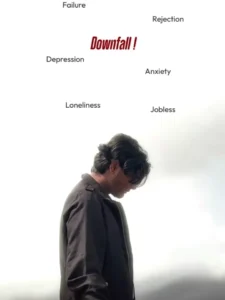
Friends, let’s talk about this viral video editing template. In it, you’ll see devotional editing. It depicts devotional editing of Lord Shiva. The concept of this editing is that even if life is full of sorrow, if Lord Shiva is with us, everything will be fine. You’ll find similar editing in this template: a video starts, first showing a person standing in a sad pose, with the text “Downfall” visible in the background. Then, one by one, different text messages appear, such as “Depression, Anxiety, Failure, Loser,” to depict the problems in a boy’s life. Then, with a transition effect, the scene changes, showing the person facing the sky, and in the background, a large, fierce image of Lord Shiva appears, and lightning flashes. It seems as if God is with us to protect us. And friends, you can do the same fitting; you can replace the person and add your own clip. I’ll explain the process as well.
How To Use This Capcut Template
Friends, if you want to edit your video using a Capcut template, then using a Capcut template is quite easy. First, install the Capcut application on your phone. Open it and go to the “Discover” option. Here, you’ll find numerous templates that you can use for free. Click on the “Search” option and search for the template you want by typing its name. You’ll find that template. You can use it. If you can’t find it, I have another way.
- Click on the “Check Template” button on our website.
- The application will open, and you’ll see a preview of the template.
- You’ll see a “Use” button. Click on it, and then add your clip to it.
- You’ll need to provide as many clips as you need.
- Then click “Next.” Your video will be created and ready in a few moments.
- This way, you can automatically edit your video.
Conclusion
So friends, I hope you liked this viral video editing tutorial using template and you would have easily understood the entire process by reading this article and now you will be able to edit your videos easily. Please note that we’ve shared the template link for your help. We’ve also explained the process, which is a fairly general process, and we don’t own it. This template is for the CapCut application itself, and you can use it in that application. If you’d like more direct links to unique and trending video editing templates like this, you can check them out on our website. Using them, you can automatically edit your videos. For such unique training video editing tutorials, visit our website and we will provide you!Video Editing! teach me how to do it