Helicopter AI Video Editing – Hello friends! In today’s article, I’m going to show you how to create a viral Helicopter Entry AI Video Editing using AI. You may have already seen this type of video on Instagram, where an AI-generated scene looks surprisingly realistic even though the entire video is created with the help of AI. The best part is that you don’t need to do complicated manual editing for this effect. With the right image and a simple AI video prompt, you can create a similar video using your own face. In this article, I’ll explain the complete process in a simple way so that you can easily create your own AI video.
Details Of Helicopter AI Video Editing
So friends, what is this video editing? If we talk about it, then in this video editing, you will see a type of editing. In it, there is a man who descends from a helicopter. However, this scene has been created in the same way as it is created in films. It was inspired by scenes from South Indian films. So, in the video, you will see a scene where first we are shown a scene of someone’s feet being lowered from under a helicopter. While adjusting his jacket, he starts reading further. At this time, the video has been slowed down. This scene looks very attentively atmospheric and realistic. You can also create such a scene, and your video will look absolutely realistic. You are being provided with a video print in the article. You have to create the video with its help. First, read the article and get all the information, then easily create the video.
What Do We Need for AI Editing?
Friends, the first thing you need for this AI video is a suitable photograph. Since we are going to generate the video with the help of AI, your image will be used as the reference for creating the scene. For this particular editing style, you can use a photo of yourself standing or working in a field. You can either take a new picture in a field or use an existing photo that fits the scene. The image should be clear and should show you properly so that the AI can understand the subject and create a realistic video. After uploading the image, the prompt will provide the details needed to generate the complete scene, including the field environment and helicopter entry. You can also use a photo where you are harvesting crops in a field to make the video look more natural and suitable for this concept.
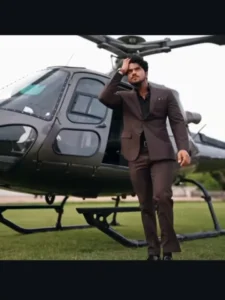
Video Prompt –
Use the uploaded reference image as the exact identity reference for the main character. Preserve his tace, racial structure, skin tone, hairstyle, beard, body proportions and overall appearance exactly. Do not change his identity.
Create a hyper-realistic cinematic luxury-action scene.
A stylish young man wearing a perfectly tailored dark brown three-piece suit is stepping out of a matte dark military-style helicopter parked on a green lawn in front of an elegant grand European-style building.
The helicopter door is open.
Start with a medium-wide cinematic side shot showing the helicopter and the character. He confidently steps d
How To Generate Your Video
Friends, creating this AI video is quite simple if you follow the steps correctly. First, click on the Generate Video button provided on the website. This will take you to the Flow AI website. After opening Flow, log in with your email address and click on the Create Project option to start a new project. Once the project opens, select the Text option from the dashboard and then choose Frame and Video. After that, click the + icon to upload your reference image. Now copy the AI video prompt provided below the image on our website and paste it into the required text box. Make sure your image is uploaded correctly before generating the video. Finally, click the Generate button and wait for the AI to process your request. After a few moments, your video will be generated with the required scene and effects. You can then preview the result and save the final AI video.
Conclusion
Friends, this is how you can create a fun Helicopter Entry AI Video using your own image. In this concept, you are shown working or harvesting crops in a field while your AI girlfriend arrives in a helicopter and creates a fun cinematic scene by fanning you and helping you stay cool.
The concept is simple, creative, and perfect for experimenting with trending AI video editing. If you want to create more interesting AI-generated videos using your own photos, you can explore other tutorials and prompts available on our website.
So friends, try this AI video editing idea and create your own version to share with your friends and on soc