Boys Gang Capcut Template – A new video editing style featuring a group of boys is currently going viral on social media; the video highlights how every guy in the group possesses a unique talent or skill. In this article, we will teach you how to easily create this fun and creative video using your own clips. It is incredibly simple: by using the template provided here with just a standard photo, you can generate the finished video. To do this, however, you need to read the article carefully; I will provide a detailed guide on how to use the template to easily create this “boys’ gang” style video.
Details Of Boys Gang Capcut Template
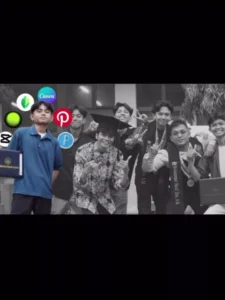
Let’s start by discussing this template; the editing style used here is both creative and humorous. You can use it to recreate memories with your friends. The concept highlights how, in a group of male friends, every guy possesses a specific talent—whether it’s mastery in music, gaming, video editing, academics, or sports. Everyone has a unique skill, and this template showcases that through creative editing. In the video, a group photo is used; as the music plays, the video pauses on each guy, and his talent is displayed using emojis and clip art—creating a funny effect. For instance, the editor has an editing app logo behind his face, while the music enthusiast has a guitar added behind him. Various icons are used in this way to craft the video, and you too can create a similar video featuring your own friends.
What You Need To Do This Editing?
For this video edit, you don’t need to use actual video clips; you can create the video using just a single photo. You should choose a photo that features your friends or colleagues, as a group shot is required. You could even use a picture with your childhood friends to create a nostalgic video that highlights what your friends were like back then. It’s a very creative idea.

Update – Friends, in this article, I’m providing you with another new template featuring a boys’ gang video, which is edited with a full attitude vibe, so you can easily edit a group video with your friends. This editing technique is quite trendy right now, so you can easily use it to edit your own. You can use the template in the same way as described earlier.



Update – Friends, today in this article I’m offering you a new editing wall template, where you’ll see a new editing experience. This template features a video of friends, depicting how you initially had many friends, but then, over time, they all left, and in the end, only your true friend remains with you, who is still with you. In this template, you can use and edit videos of your friends or your brothers. The method is the same; you’ll find this template in the button below the first image.
How To Use Boys Gang Capcut Template
Friends, let me explain the simple way to use this CapCut template in this paragraph. To use the template, you must have the CapCut application installed. Open the app, go to the ‘Discover’ section, and search for the template by name; once you find it, you can use it to edit your video. Sometimes, the template doesn’t appear in the search results, so I have an alternative method to help you—just follow the step-by-step instructions below.
- To use this template, simply click the “Check Template” button provided in the article or open the template directly in the CapCut app.
- You will see a preview of the template along with a “Use” button; click that button.
- Your gallery will then open, allowing you to select the necessary video clips.
- After selecting them, click “Next” and wait a moment; the template will automatically edit your video.
- And it will be ready to go.
Conclusion
I hope you really enjoy this viral “boys’ gang” video edit and find it easy to create using the template. Please share your feedback in the comments and let us know what you think of the edit. If you want to learn more unique video editing styles, you can visit this website to learn—and share it with your friends so they can learn too.