Garba Ni Ramzat Capcut Template – As the festival of Navratri is currently underway, devotional reels have been going viral across social media platforms. So, friends, I have brought you a tutorial for editing just such a viral reel. You have surely come across this type of video—which is currently trending on Instagram—and many of you specifically requested a tutorial for this viral Gujarati video editing style. Therefore, in response to this demand, I am sharing a template in today’s article that will enable you to create your own devotional Gujarati video edits. Friends, you can utilize this template within the CapCut application to perform your editing. You won’t need to do any manual editing; simply open the template, apply it, and add your own video clips—the template will then automatically edit your footage for you. Furthermore, I will also walk you through the process of using this template; if you read through this article, you will find all the necessary information you need.
Details Of Garba Ni Ramzat Capcut Template
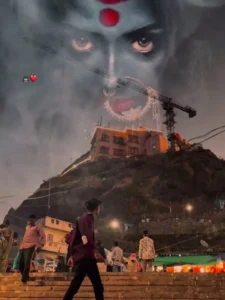
Take a look at this template; it showcases creative editing imbued with a profound sense of devotion. Furthermore, this template features a glimpse of the fierce and formidable form of Goddess Kali. In the template’s preview, you will observe a video playing; initially, it features a blur effect, after which the clip becomes visible, displaying a slow-motion sequence. The very next moment, an image of Goddess Kali appears in the sky—an image that has been seamlessly incorporated into the video. Following this, you will notice “beat editing,” where visual effects have been perfectly synchronized with the rhythm of the accompanying song. Friends, this template also incorporates shake effects and animations. Moreover, you can effectively utilize this template for your Navratri-themed video edits.
How to Record Clip For This Editing
To perform this video edit, we require a specific type of footage—specifically, a clip featuring a prominent background, meaning it should be filmed from a low-angle perspective. Therefore, begin by recording your clip, and then proceed to edit it. Before recording, select a suitable location; I suggest filming your video at a large temple or a pilgrimage site. Record yourself walking up the steps of the venue, ensuring that the temple itself appears clearly in the background of the shot. Furthermore, maintain a low camera angle to capture the perfect clip; once you utilize this footage within a template for editing, the final result will be absolutely flawless.
How To Use This Capcut Template
Friends, the link to the template you requested has been provided in the button above. Now, regarding how to use it: simply read through this paragraph step-by-step. In it, I provide a step-by-step guide on how to utilize this template.
- First, click the “Check Template” button to open this template directly within the official CapCut application.
- Before using the template, it is essential that CapCut is on your phone.
- f you don’t have it yet, please install the CapCut app first, and then proceed to use the template.
- Once opened, the template interface will appear, and you will see a preview of the template.
- Located just below the preview, you will find a “Use Template” button.
- Click this button to add your video clips.
- Add as many clips as required for the template, and then click the “Next” button.
- Your video will now begin editing automatically and, after a few moments, it will be ready.
- You can then save it by clicking the “Export” button located in the top corner of the screen.
Conclusion
I hope you have understood the editing process. Simply follow the steps outlined above to use the template, and you shouldn’t encounter any issues. Friends, please use this template and share your feedback with us so that we can continue providing you with more new and trending templates like this one. Additionally, links to other new and trending templates are available on our website, so feel free to check those out as well. If you enjoyed this article, please be sure to share it with your friends.