Navratri Ai Video Editing Prompt – Friends, as you all know, the festival of Navratri is coming. Like every year, this year too, it is in the month of October. Friends, you may have noticed on social media that people have started sharing Navratri-related videos by editing or editing photos, and Navratri videos are going viral. Similarly, a Navratri video created with the help of AI is going viral right now. Friends, in this viral video, we are shown a video of the nine forms of Goddess Durga. The video looks quite realistic. So, friends, many people want to make such videos for themselves, but they don’t know how to make this viral AI video. Therefore, in this article today, I am going to teach you how to make this Navratri AI video, which is explained in detail in this article. If you want to make your own Navratri AI video, then follow this article.
Details Of Navratri Ai Video Editing Prompt
Look, we see Navratri-themed editing in the video. I’ll tell you the details. In this video, you’ll see that the video starts with a moving metro, with a person sitting inside, looking out the window. Then, the metro starts moving, and through the window, we see nine forms of Goddess Durga appear one by one, each of them riding on their own. The person is mesmerized by this and starts recording with his phone. And friends, in place of that person, there will be a video of you, showing your face. We can easily create this video identically from a photo. We just need to know the correct process, which I’ll explain in this article.
Method Of Creating Video
Friends, to create this viral AI video, we’re going to use a simple method. We’ll use Google Flow, where we’ll create a video using a video prompt with a reference image. Our video will be created easily. I’ll explain the steps in the following paragraphs.
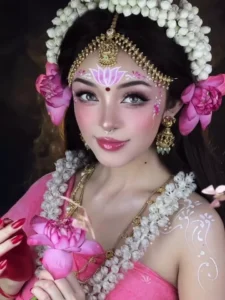
Use the uploaded reference photo as the exact identity reference for the main subject. Create a beautiful, cinematic Navratri transformation video inspired by Indian Goddess Durga aesthetics, devotional fashion, and viral AI transformation reels.VIDEO FORMAT: Vertical 9:16, ultra-realistic, cinematic portrait photography, smooth seamless transitions, highly detailed facial features, premium Indian festive aesthetics, dramatic studio lighting, 4K visual quality.IDENTITY PRESERVATION — VERY IMPORTANT:The person in the uploaded reference photo must remain the exact same person throughout the entire video. Preserve the original facial structure, eyes, nose, lips, jawline, skin tone, age, and natural identity in every transformation. Do not replace the face with another woman or generate a different person. Only change the makeup, hairstyle, jewellery, costume, head ornaments, and divine visual effects. Every transformed look must clearly resemble the same person from the reference image.SCENE 1 — ORIGINAL LOOK (0–2 seconds):Begin with the person wearing the exact outfit from the reference photo, standing naturally and looking directly into the camera. Use a clean, softly illuminated background. She makes a subtle graceful hand movement near her chest, with a gentle smile and natural blinking. The camera slowly moves closer to her face. Maintain realistic skin texture and natural body movement.SCENE 2 — PINK FLORAL DEVI TRANSFORMATION (2–3 seconds):A soft wave of glowing pink particles passes across the frame. Seamlessly transform her into a beautiful pink-and-white Goddess-inspired festive look. Add an intricate golden headpiece, fresh white jasmine flowers arranged around her hair, pink roses near the ears, elegant traditional jewellery, a decorative forehead ornament, and delicate pink makeup. Her facial identity must remain unchanged. Use a close-up portrait with a dreamy floral background.SCENE 3 — SHIVA SHAKTI LOOK (3–4 seconds):The background smoothly transitions into a dark, mystical, smoky environment. Her hairstyle becomes a traditional high bun decorated with jasmine flowers and rudraksha-inspired ornaments. Add three horizontal white sacred forehead markings with a red central mark, subtle devotional makeup, traditional necklaces, and joined hands in a respectful namaste gesture. Soft blue moonlight and a gentle divine aura illuminate her face.SCENE 4 — ROYAL BLUE DURGA LOOK (4–5 seconds):A bright circular blue-white halo gradually forms behind her head. Transform the costume into a rich royal-blue traditional outfit with elaborate gold jewellery, a traditional crown, a red bindi, and fresh flowers. Add a subtle third-eye-inspired forehead design, keeping it elegant and symmetrical. She raises one hand in a traditional blessing gesture while looking confidently into the camera. Add a few floating flower petals.SCENE 5 — GOLDEN DIVINE DEVI LOOK (5–6 seconds):A warm golden light sweeps across the frame, transforming the previous look into a radiant golden-and-yellow Goddess-inspired appearance. Add a detailed golden crown, yellow flowers around the hair, layered gold necklaces, and intricate traditional forehead artwork. She gently holds a decorative brass bowl filled with glowing flower petals. Add tiny golden particles floating in the air and a rich amber cinematic background.SCENE 6 — RED DURGA ROOP (6–7 seconds):The golden light turns into a deep crimson glow. Transform her into a powerful yet graceful red Durga-inspired look with a red traditional outfit, ornate gold crown, red roses, heavy traditional jewellery, and symmetrical devotional face painting. Her expression becomes confident and divine. One hand faces forward in a blessing gesture. Add a dramatic dark background with subtle red and gold particles, realistic fabric movement, and detailed jewellery reflections.SCENE 7 — COSMIC DIVINE TRANSFORMATION (7–8 seconds):The surroundings become a mystical cosmic environment. A glowing circular energy ring forms behind her head, with subtle star-like particles and deep blue-golden light. Her costume becomes a richly decorated traditional devotional outfit. Maintain the exact same face and identity. Add a soft third-eye-inspired forehead ornament and a graceful arrangement of flowers. The camera slowly pushes in for a powerful cinematic portrait.SCENE 8 — FINAL GRAND NAVRATRI LOOK (8–10 seconds):Finish with the most spectacular traditional Goddess Durga-inspired appearance. She wears a magnificent golden crown, red and green traditional attire, intricate gold jewellery, a large floral garland, and detailed red devotional forehead artwork. A radiant golden halo shines behind her head. She looks directly into the camera with a calm, powerful expression while raising her right hand in a blessing gesture. Red flower petals gently fall in slow motion, and golden particles shimmer around her. End with a stable, beautiful close-up portrait and a luminous divine background.TRANSITIONS AND MOTION:Every transformation must flow smoothly into the next using light sweeps, glowing particles, soft smoke, floral wipes, and seamless morphing effects. The face must stay correctly aligned during each transition. Do not use abrupt cuts, sudden face changes, flickering, facial distortion, or unnatural body movements. Keep the camera movement smooth and cinematic.VISUAL STYLE:Photorealistic Indian festive portraiture, authentic traditional Indian jewellery, detailed fabrics, realistic flower garlands, elegant Goddess Durga-inspired makeup, rich red, royal blue, pink, white, and gold color palettes, volumetric lighting, realistic shadows, beautiful depth of field, devotional and respectful atmosphere.STRICT NEGATIVE INSTRUCTIONS:No face swapping, no identity drift, no different faces between scenes, no cartoon appearance, no plastic skin, no excessive beauty filters, no distorted eyes, no extra fingers, no deformed hands, no duplicate facial features, no unnatural jewellery, no random costume changes, no text, no subtitles, no watermark, no logos, no abrupt transitions, and no scary or demonic expressions.The final result should look like a premium viral Navratri AI transformation reel, with the exact same person from the uploaded reference photo appearing in every divine look.
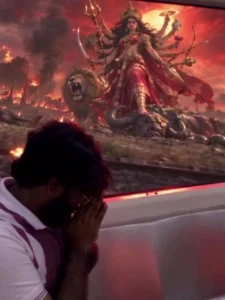
A 10-second highly realistic, cinematic POV video from inside a fast-moving metro train. For the first 3 seconds, a young man (@YourName) is sitting on the seat, looking out the window at a normal, fast-moving, blurred dark metro tunnel. He gives a curious, amazed, and natural reaction as a bright divine light begins to glow outside. For the remaining 7 seconds, the view outside the window completely transforms into a breathtaking, high-end VFX sequence showing the dynamic, hyper-realistic divine forms of Goddess Durga. The outside scenery changes rapidly: a goddess riding a majestic white bull in snowy mountains with a glowing sunrise, another on a fierce roaring lion in a fiery battlefield, a giant waterfall, and a goddess seated on a glowing pink lotus. The cinematic divine light seamlessly reflects on the man's face inside the moving train. The transition is smooth, highly detailed, and looks completely natural without being over-edited."
How To Generate Your Video?
Friends, first of all, copy the video generation prompt provided in our article. After that, search for the AI video generation tool on Google and open the official website from the search results. Once you reach the website, create an account or sign in to your account. After logging in, click on the “New Project” option to start creating your video. Now, click the plus (+) icon at the top and upload your reference photo. Using a clear and suitable reference image is important because the AI will use it to create the video according to your prompt. Once your photo has been uploaded, click on the plus (+) option available below to start the creation process. Now paste the prompt you copied earlier into the prompt box. After that, adjust the required settings. Select the 9:16 aspect ratio for a vertical video and choose “Omni Flash” as the model. Finally, click on the “Generate” button and wait for the AI to process your request. After processing is complete, your AI-generated video will be ready.
Conclusion
Friends, by following these simple steps, you can create your AI video in just a few minutes. The generated video will be around 10 seconds long. If you want to create a longer video, you’ll need to follow an additional process after generating the first 10-second clip.
If you want to know how to extend the video and create a longer version, let us know in the comments, and we’ll explain the complete process in the next guide. So friends, try this AI video generation method with your own reference photo and create your own creative video.