AI Love Story Video Editing – Friends, AI has completely changed the way people create content on social media. Nowadays, creators are using AI tools to generate realistic photos and videos that look so natural that it’s difficult to tell they were made with AI. By combining creativity with AI, people are creating unique content that is quickly going viral on Instagram and other social media platforms. One such trend is AI Love Story Video Editing, where a romantic cinematic scene is created using AI. Many people have been asking how they can make this type of video with their own face and their partner’s face. In this article, I’ll explain the complete process in a simple way so you can easily create your own AI love story video by following each step.
Details Of AI Love Story Video Editing
As mentioned earlier, this video is completely created with the help of AI. The editing presents a beautiful love story in a realistic cinematic style. The video begins with a boy standing beside his bike on the roadside, checking his watch as if he’s waiting for someone. After a car passes by, the scene changes, and a girl walks toward him from the opposite side. As soon as the boy sees her, he becomes lost in the moment, and the scene switches to smooth slow motion, giving the video a romantic and emotional feel. The cinematic visuals and realistic AI-generated effects make the entire sequence look like a scene from a movie. With the right prompt and AI tool, you can easily recreate this viral editing style using your own photos.
Process Of This AI Video Editing
The process of creating this AI video is very simple. You only need three things: your photos, a video prompt, and an AI video generation tool. First, prepare two clear photos—one of yourself and one of your partner. Make sure both images clearly show your faces, as they will be used by the AI to generate realistic results. Next, copy the video prompt provided in this article. Finally, use an AI video generation tool such as Google Flow AI to create the video. Upload both reference images, paste the prompt, and let the AI generate your cinematic love story video. The complete generation process is straightforward and can be completed within a few minutes.
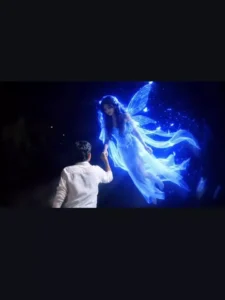
Image Prompt –
A cinematic nighttime scene of a young man seen from behind with his right hand raised high. A beautiful, brightly glowing fairy-like girl surrounded by a radiant blue magical aura is hovering in the air right above his hand. She is flying down to gently hold his raised hand while looking directly at him. Magical realism, fantasy elements, high quality and highly detailed."
Video Prompt –
Use the uploaded image as the exact reference frame. Keep the boy, face direction, pose, white shirt, hand position, background trees, night atmosphere, lighting, colors, composition, and camera angle completely unchanged. No background change, no dress change, no face change, no color grading change, no extra objects, no watermark.

Action: A beautiful glowing blue fairy-like girl

appears from a short distance directly in front of the boy, floating slowly toward him in a straight line. She is looking only at the boy. She gently flies closer, extends her hand, and places her hand into the boy's already raised hand exactly as shown. The boy slowly pulls her toward himself using their joined hands. The fairy moves naturally toward him and softly lands on the ground directly in front of him while maintaining eye contact with him. Her movement is smooth, magical, romantic, and realistic. Blue particles and soft glowing light trail around her body.**
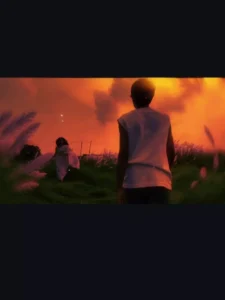
Image Prompt –
Use the uploaded photo as the main reference and keep the original person completely unchanged. Do not alter my face, facial features, hairstyle, body proportions, clothes, pose, skin tone, or any existing details.

Add one adult Indian woman in a beautiful traditional saree, running naturally from the front toward me. She should be positioned realistically in the scene, clearly facing toward me, with natural running movement and body posture. Her saree and pallu should move naturally with the motion, creating a realistic sense of movement.

She should look like a real adult Indian woman with natural facial features, realistic skin texture, authentic hair, and believable proportions. Give her an elegant, simple saree with natural fabric folds and realistic details.

Match the original photo’s camera angle, perspective, lighting, shadows, color tones, depth of field, and environment perfectly so she looks genuinely present in the original photograph rather than digitally added.

Maintain realistic interaction between her and the environment, including accurate ground contact, natural shadows, motion in the saree and hair, and correct scale relative to me.

Ultra-realistic photography, natural Indian aesthetic, cinematic composition, realistic lighting, detailed fabric texture, realistic skin, authentic proportions, professional DSLR photography, high detail, seamless photo compositing.

IMPORTANT: Do not modify or regenerate me or any existing object in the original photo. Only add the adult woman and integrate her naturally into the scene.
Video Prompt –
Use the uploaded image as the exact first-frame reference. Preserve the original scene, my appearance, clothing, body proportions, environment, fence, green field, trees, cow, sky, and overall composition exactly as they are.

Create a realistic cinematic slow-motion video.

The adult Indian woman in the saree starts running naturally toward me from the background. Her movement should be graceful and realistic, with her saree and pallu flowing naturally in the wind, hair moving softly with each step, and realistic running motion.

At the same time, I slowly walk forward away from the camera along the same path. Keep my back-facing appearance, black T-shirt, dark pants, hairstyle, body proportions, and walking direction consistent with the original image.

Both characters should move naturally and smoothly in synchronized slow motion. The woman gradually gets closer to me while I continue slowly walking forward. Maintain realistic distance and scale between both characters.

Use cinematic 60fps slow-motion aesthetics, natural body movement, subtle motion blur, realistic cloth movement, natural hair movement, accurate foot-to-ground contact, realistic shadows, and physically accurate lighting.

Camera should remain mostly stable and cinematic, with a very subtle smooth forward tracking movement. Preserve the original camera angle and composition. Do not suddenly zoom, rotate, or change the location.

Keep the rural Indian countryside atmosphere, cloudy sky, green paddy field, fence, trees, wall, and cow unchanged.

Ultra-realistic live-action footage, cinematic color grading, natural lighting, realistic physics, shallow natural depth of field, subtle film grain, high detail, smooth motion, emotional cinematic atmosphere.

IMPORTANT:
Do not change my face or appearance.
Do not redesign or alter my clothes.
Do not change the woman’s identity or clothing during the video.
Do not add extra people.
Do not distort faces, hands, legs, bodies, saree, fence, plants, or background.
No teleportation, no sudden movements, no unnatural running, no floating feet.
Maintain temporal consistency throughout the entire video.
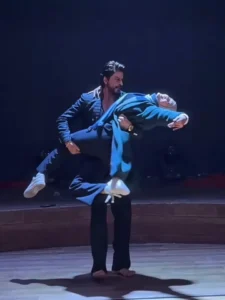
Update – Friends, today in this article I’m promoting a new AI video that’s currently going viral. It features a dancing video with Shah Rukh Khan that looks absolutely real. You can easily create it using Flow AI. The prompt has been provided. You have to make a video from Flow AI using the video prompt. If you want to know the process of making a video, then you can scroll down and read the paragraph on how to generate video.
Video Prompt –
A cinematic ultra-realistic 4K/8K video (9:16) of a young man wearing a black textured blazer over a black button-down shirt and black trousers, barefoot, and a young woman with long open flowing hair wearing a teal-green long coat, a blue-and-grey striped scarf, black trousers, and beige ankle boots, performing an emotional expressive dance together on a dimly lit circular wooden stage, dramatic single spotlight illuminating them from above against a deep black background, theatrical premium cinematic look with rich full color grading — warm skin tones, deep blacks, and glowing blue-white stage light, not desaturated or dull, smooth fluid slow-motion quality throughout every movement. A small, subtle watermark reading 'NoorEditing07' stays fixed in the bottom corner throughout the entire video, minimal white or light-colored font, low opacity, appearing only once at all times.

CRITICAL: use the two uploaded reference photos as the exact identity source for each person — any person and any woman can upload their own individual reference photos to generate this video with their own likeness. Same faces, same exact facial features, same exact bone structure, same natural smooth clear skin with no blemishes or texture flaws, and the exact same body types and builds as shown in the uploaded photos, maintained precisely and identically in every single scene with absolutely zero facial drift, zero identity change, and zero morphing between scenes for either person. The face of each person must remain exactly the same from Scene 1 through Scene 7, never shifting, blending, or turning into a different-looking face at any point, even during fast movement, spins, or lifts. This must work accurately for any two people of any age or body type who upload their own reference photos — the generated faces, skin, and bodies must always match the uploaded photos exactly, never generic or different faces.

Scene 1: Wide shot — they hold hands and walk together smoothly onto the center of the dimly lit stage, her long hair flowing naturally over her shoulders, a single spotlight glowing above them, warm intimate connection, deep black backdrop, gentle unhurried pacing.

Scene 2: Medium shot — they stand facing each other, hands clasped together, gazing warmly into each other's eyes, her hair softly framing her face, soft spotlight illuminating their faces against the dark stage, calm smooth stillness.

Scene 3: Wide shot — they raise their joined hands together in a smooth joyful gesture, both smiling, spotlight glowing warmly above them, her hair catching the light, fluid graceful motion.

Scene 4: Dynamic full-body wide shot — he holds her close and smoothly lifts her as he spins her in one continuous fluid full 360-degree rotation around himself, her long open hair flying outward and swirling gracefully with the full turn, her teal coat and scarf flaring outward at the same time, her feet lifting off the ground as she completes the entire seamless circular rotation around him, both moving in perfect fluid sync on the wooden stage, camera smoothly circling to capture the complete 360-degree spin without any jarring motion.

Scene 5: Wide shot — they stand with arms spread wide apart while holding hands, leaning back smoothly in a joyful, free-spirited pose, her hair gently flowing with the motion, warm spotlight glowing above them.

Scene 6: Dramatic wide shot — he smoothly dips her gently backward in a graceful classic dance dip, her long hair cascading downward toward the floor as she leans back, one of her legs lifting gracefully off the ground with her boot pointed, her coat draping elegantly as he supports her fully with both arms in one fluid controlled motion, intimate romantic moment under the spotlight, then he smoothly and gently lifts her back upright.

Scene 7: Final emotional shot — he smoothly lifts her fully off the ground into his arms, cradling her securely, and rotates in one continuous fluid full 360-degree turn while carrying her, her hair and coat both flying outward gracefully throughout the entire seamless rotation, her legs lifting gracefully with the spin, both smiling warmly at each other, then as the rotation completes he gently and smoothly lowers her into a warm close embrace, her hair settling softly around her shoulders as they hug, one foot lifted off the ground, spotlight glowing softly around them, cinematic slow zoom-out to finish.

Overall style: same faces, same identities, same natural smooth skin, same exact body types for both people as shown in their uploaded reference photos, same black blazer-and-trousers outfit for him and teal-green coat with scarf and long open flowing hair for her consistent in every single scene, no outfit change, no identity, body, or facial change for either person in any scene, same real dimly lit circular stage location with dramatic spotlight throughout, smooth fluid graceful full-body dance movement including full seamless 360-degree spins, twirls, dips, and lifts exactly matching an expressive live dance performance, with her hair and coat both dynamically flying and flowing gracefully during every turn and spin, no jerky or abrupt motion anywhere, realistic skin and fabric texture, rich full premium cinematic color grading with warm tones, deep blacks, and glowing spotlight highlights — full natural color, not faded or desaturated — filmic depth and contrast, smooth cinematic transitions between poses, ultra-realistic premium 4K/8K quality, vertical 9:16 format, continuous emotional story flow from start to end, no scene skipped, only 7 scenes total exactly as described.

Watermark (final instruction): keep a single small, subtle, clean text watermark reading 'NoorEditing07' fixed in the same bottom corner position throughout the entire video, minimal white or light-colored font, low opacity, non-intrusive, appearing only once on screen at any given time.
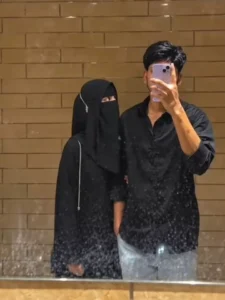
Image Prompt –
Ultra-realistic natural mirror selfie photograph of me and a young woman standing together in front of a large slightly dirty bathroom/mall mirror. Use my uploaded selfie as the ONLY facial identity reference for the boy. Preserve my exact natural facial features, face shape, skin tone, hairstyle, hairline and overall identity with absolutely no beautification, face reshaping or identity change.

The boy stands on the right side, wearing a loose black full-sleeve casual shirt and light grey/washed trousers. He holds a light lavender/purple smartphone vertically directly in front of his face with one hand, exactly like the reference photo. The phone naturally covers most of his face, with the same grip, hand position and angle.

The young woman stands very close beside him on the left, wearing a full black hijab and black abaya. She is approximately the same height as the boy. Her head is gently resting on the boy’s shoulder, creating a natural affectionate pose. Her body is slightly leaned toward him.

Her hand is gently held by the boy’s free hand, with their hands naturally joined around waist level. Fingers must be anatomically correct and naturally positioned — no extra fingers or distorted hands. The pose should look spontaneous and comfortable, matching the intimate casual feeling of the reference.

Match the reference composition closely: boy on the right, hijab-wearing girl on the left, their bodies close together, her head resting on his shoulder, their hands joined, smartphone covering the boy’s face, same approximate height relationship and same mirror-selfie perspective.

Warm brown/tan horizontal rectangular tiled wall in the background, glossy reflective surface, many realistic mirror smudges, fingerprints, dust and water marks. Sink/counter edge subtly visible at the bottom.

Natural warm indoor lighting, realistic shadows, authentic skin texture, detailed black hijab and clothing fabric, realistic hands, believable mirror reflection and ordinary smartphone-camera quality.

Photorealistic real-life mirror selfie, NOT an illustration, NOT CGI, NOT overly cinematic, NOT AI-looking. Preserve natural proportions and realistic anatomy. No extra people, no extra hands, no duplicate limbs, no distorted fingers, no text, no watermark.
Video Prompt –
Create an ultra-realistic 100% slow-motion mirror selfie video. The boy must remain completely frozen in the exact same pose as the source image throughout the entire video. His lavender smartphone must stay vertically positioned directly in front of his face and MUST completely cover and hide his face at all times.

CRITICAL FACE LOCK: The boy’s face must NEVER become visible, even for a single frame. Do not reveal, reconstruct, morph, uncover, or generate any part of his facial features. The phone remains firmly in front of his face for the entire video. His hairstyle, head position, phone position, arm and body position remain unchanged.

The girl starts with her head resting gently on his shoulder. Everything happens in extremely slow motion — approximately 0.25× real-time speed, with smooth continuous movement and no fast movements.

First, the girl very slowly lifts her head and looks upward toward the boy.

The exact moment she looks upward toward him, the lighting gradually becomes darker and moodier, smoothly transitioning into a dark low-light atmosphere. Do not make it an abrupt cut. Keep her face naturally visible with subtle shadows and realistic skin texture.

After looking toward him, she very slowly places her hand into the boy’s free hand. Their hands gently meet and remain naturally joined. Fingers must move slowly and realistically with correct anatomy.

Finally, the girl very slowly turns her eyes/face toward the mirror camera and looks directly at the camera, maintaining a calm natural expression.

EXTREME SLOW MOTION: Every movement must be visibly slow and fluid from beginning to end. No normal-speed sections, no sudden acceleration, no jump cuts. Natural micro-movements, subtle breathing and realistic cloth movement only.

Camera completely stationary. Same mirror perspective, same framing, same background, same clothing and same positions. Photorealistic real-life footage.
Love Story Video –
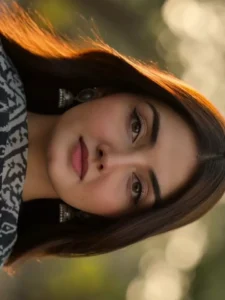
Cinematic 4K photorealistic video, 15 seconds, natural golden hour light. Widetree-lined Bangalore city boulevard, tall rain trees overhead canopy, warmamber sunlight through leaves, dappled gold on tarmac, ambient city sounds.BEAT 1 — 0:00 to 0:04: Young Indian man from @Image1 stands on near-sidefootpath beside a black bike, facing camera. Black hair, clear glasses, darkbrown linen button-up shirt white buttons chest pocket sleeves rolled, creamwide-leg pleated trousers, white sneakers, silver watch left wrist from@Image3. Head slightly down casually checking his watch, relaxed andcompletely unaware. Black Porsche 911 GT3 enters from left at road speed —horn blares once — car sweeps through foreground in shallow focus blurblocking full road view for one second, powerful wind whoosh as it passes.
BEAT 2 — 0:04 to 0:07: Car clears frame — slow motion begins instantly. Onthe opposite footpath directly across, a young Indian woman from @Image2steps off the far kerb beginning to cross — walking straight toward camera.Car's wind wake hits her at this exact moment — straight dark hair explosivelylifting and blowing toward camera. Black fitted full-sleeve top, red bandhaniwave-print tiered maxi skirt billowing forward around her legs, black white ikatdupatta with tassels flying toward camera, silver oxidised necklace andbangles catching golden light, flat kolhapuri sandals from @Image4. She walksstraight forward facing camera, eyes ahead, calm natural expression,completely unaware of him on the opposite pavement. BEAT 3 — 0:07 to 0:10:Cut to tight front close-up of the man's face. Head lifted from watch, eyeswide and still fixed straight across the road, mouth barely parted, glassescatching soft golden light. Pure quiet stunned stillness. First sight. No theatrics.Completely natural. BEAT 4 — 0:10 to 0:12: Cut back to her — slow motion —mid-road walking straight toward camera, red skirt swaying, dupatta tasselsdrifting, hair gradually settling. She never glances toward him. Fully in her ownworld. BEAT 5 — 0:12 to 0:15: Slow motion close-up of her beautiful face.Straight dark hair softly blowing and settling, warm amber light falling acrossher features, soft skin, dark expressive eyes looking straight ahead, gentlenatural expression, silver earrings catching light. Quiet effortless beauty. Shestill does not know. Shallow depth of field, warm golden bokeh tree canopybehind. Wind sound fading to silence. Anamorphic lens, natural bokeh, nofilters, no music. Diegetic sound only — car horn, wind whoosh, ambient cityhum, fading breeze. Pure documentary realism. No jump cuts.
How To Generate Ai Video?
Friends, to generate an AI video, simply copy the video prompt provided in this article and open the Google Flow website. You can also access this website by clicking the “Generate Video” button included in the article. Next, log in to the site, click on “New Project,” select “Start Frame” to upload your image, paste the prompt, and click the “Send” button. In just a short while, your AI video will be ready. You can then save it. Friends, this entire process is available to you completely free of charge.
Conclusion
Friends, this is how you can easily create your own AI Love Story Video Editing using just two photos and a prompt. By following the steps explained in this article, you’ll be able to generate a realistic romantic video featuring yourself and your partner without any complicated editing. If you enjoy creating AI photos and videos, keep visiting our website. We regularly share trending AI prompts, creative editing tutorials, and the latest template-based editing guides to help you create unique viral content. I hope you found this tutorial helpful, and if you did, don’t forget to share it with others.