Attitude Bhojpuri Capcut template – Friends, a video editing technique is currently going viral on social media, featuring an attitude-based editing technique that’s garnering millions of views. Many people are asking me for a template to edit this viral video, so in today’s article, I’ve brought you a very trending video editing template, which allows you to automatically edit your videos in one click. In today’s article, I’ll provide you with a template for this Bhojpuri video editing technique and guide you on how to easily edit your videos using the template. So, if you’re interested in editing this viral attitude Bhojpuri video, read this article to learn more.
Details Of Attitude Bhojpuri Capcut template
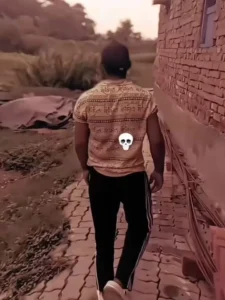
Look, the editing done in this template is something like this, first a video starts which is of a girl and she is seen doing attitude walking style and effects have been used in the video. Then after that the clip changes with transition effect and from here a video clip of a boy comes which you can replace with your clip. So in this clip the editing has been done with attitude, a brown filter has been used in it and we see a skull emoji in the video. Slow motion has been used in it and the flash effect has been bit synced. Different effects have been used in it further also. You can see it in the preview, I will tell you how to see the preview.
What Kind Of Clip You Can Use?
If you want to edit this viral attitude video, you’ll need to use a video clip of your own, which is of an attitude-type video. The first clip of the girl in the template is fixed, you just need to add your own clip. So, you can use video clips of yourself walking in an attitude-style way, shooting a video from a beautiful location, or riding a bike. You can use different attitude-feeling video clips. Make sure you use a clip that has slow motion set to apply. Now, let me give you the template and explain how to use it in the following paragraphs.

How To Use Attitude Bhojpuri Capcut template
So friends, adding a template is quite easy, and I’ll explain it to you in this paragraph. Adding any CapCut template is quite easy. First, you need to install the official CapCut application on your phone, open it, and search for the template’s name in the Discover option. You’ll find the template, and use it. However, sometimes we can’t find the template we’re looking for, and I have another solution. I’ll explain it step by step.
- First, click the “Check Template” button in the article.
- It will open directly in CapCut, and a preview of the template will appear.
- Remember, you can only click the “Template” button if you have the CapCut application.
- You’ll see the “Select” button below the preview. Click on it.
- Your gallery will open, and you can add your clips from there.
- Then, click the “Next” button. In a few moments, your video will be edited and ready.
Conclusion
So friends, I hope you’ll enjoy this viral Bhojpuri video editing template and find it easy to edit your own. Friends, I’ve explained the entire video editing process in this article. Please read it carefully and understand it. If you have any problems, you can contact us. We’ll provide you with complete assistance. For more trending video editing templates or editing lessons, keep visiting our website; you’ll easily find links to new trending templates here. If you enjoyed the article, please share it.