Haryanvi Trend Capcut Template – Friends, a new video editing style is currently going viral on social media where people are editing and sharing videos set to a specific “attitude” dialogue. The editing itself reflects this bold style, which is resonating with audiences and helping the videos go viral. If you also want to create a video using this dialogue and make it go viral, then follow this article. Today, I will teach you how to create this viral dialogue-based video and how to set up the template. You will need to read the entire article to get the full details and successfully use the template to automate your video editing. A great feature of this template is that you can use it easily to achieve that “attitude” look. So, follow along as I explain everything step-by-step, enabling you to edit your video automatically.
Details Of Haryanvi Trend Capcut Template
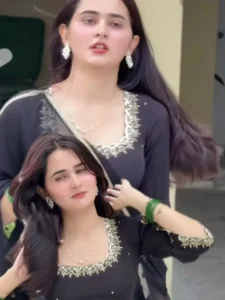
Friends, the editing in this template works like this: it starts with a video of a girl delivering an ‘attitude-filled’ dialogue in a Haryanvi accent. Then, a transition effect shifts the scene to a second clip—which is where your own video will be inserted. In this second clip, the song’s lyrics appear in Hindi text at the top of the screen, and smooth slow-motion has been applied to the footage. Flash effects are interspersed throughout, and the video features cinematic filters and a 4K effect. The template includes the song sung by the same girl, with the corresponding lyrics displayed; all you need to do is add your own clip to complete the edit, as the first clip is already fixed in the template.
What kind of clips you should choose
Now, let’s talk about the kind of clips you should choose for this type of video editing; I have several ideas to share with you. For videos with an “attitude” vibe, you shouldn’t use ordinary footage; instead, select clips that actually exude that attitude. You could use clips of yourself walking, sitting on a bike with a friend, or posing solo with a bike. As for your expressions while shooting, try running your hand through your hair, looking off to the side, or riding the bike—capture these varied expressions and then use the clips in the template. You won’t believe how amazing your edited video can turn out. I guarantee that if you use these kinds of clips with the template, the result will be incredibly captivating.

Update – Friends, in today’s article, I’m updating you with a new trading template. With its help, you can easily edit your videos in trending video style. This template features a Haryanvi song, which features a beat-sync editing style. The method for this is the same as I’ve already described in this article.



How To Use Haryanvi Trend Capcut Template
Let me explain how to use the template; it is actually very simple. First, open the CapCut app and navigate to the ‘Templates’ section. You can search for the specific template by name using the search bar at the top. However, if you cannot find the exact template you are looking for, I have an alternative method—just follow the steps below to find out.
- Start by clicking the ‘Check Template’ button provided in this article.
- This will open the template directly in the CapCut app.
- You will see a preview of the template along with a ‘Use’ button at the bottom.
- Click the ‘Use’ button to add your video clips, then tap ‘Next’ and wait a moment; the app will automatically apply the template to your video, and it will be ready in just a few seconds.
Conclusion
I hope you enjoy this video editing style featuring the viral dialogue and use it to automatically edit your own videos. I will teach you how to create more trending edits like this, so keep checking our website. Also, please note that you can use this template within the official CapCut app; we are not the owners—CapCut is.